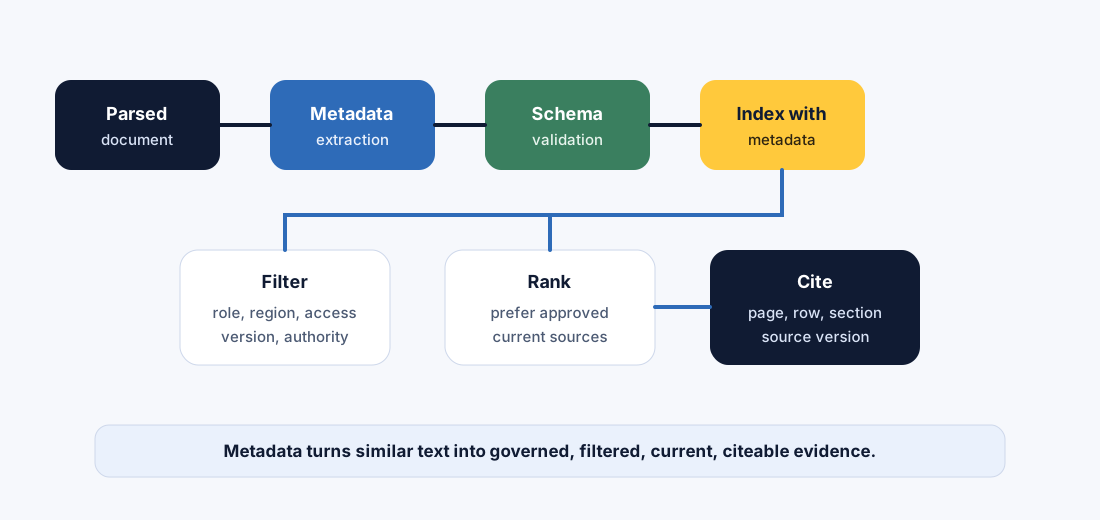
Metadata is the control plane of RAG. It tells the system what a chunk is, where it came from, who can see it, which version it belongs to, when it expires, and whether it is authoritative enough to answer from.
How to read this chapter
Read it as product control: metadata is not decoration; it decides retrieval filters, citations, access control, freshness, and evaluation slices.
Design before indexing: retrofitting metadata after a corpus is already embedded is painful and expensive.
Think schema and governance: every field needs a purpose, owner, allowed values, default behavior, and failure rule.
Keep production in view: wrong metadata can hide the right answer or expose the wrong source.
A vector can tell you what text is similar. Metadata tells you whether that similar text is allowed, current, authoritative, relevant, and safe for this user.
Core ideaMetadata is structured context attached to sources, chunks, rows, pages, and answers. It helps retrieval choose the right evidence before the model starts writing.
Sub-topic 1 of 11
Why Metadata Matters
At a glance
Metadata controls filtering, ranking, citations, permissions, freshness, and debugging.
Without metadata, retrieval becomes similarity-only, which is not enough for production decisions.
Metadata schema design should happen before chunking and indexing.
Why this matters: two chunks can be semantically similar, but one may be retired, restricted, regional, draft, or tied to an older product version. The embedding will not reliably know that. Metadata must carry it.
Imagine a user asks, "Can a contractor access customer logs during a Sev1 incident in Germany?" The answer depends on role, region, incident severity, document authority, policy version, approval owner, and access boundary. Those are metadata questions before they are language questions.
If metadata is weak, the system may retrieve a similar but wrong document. If metadata is strong, the system can filter, rank, cite, and refuse with much better control.
Metadata north starEvery field should help the system choose, protect, explain, or improve evidence.
If a field does not improve retrieval, safety, freshness, citations, evaluation, or operations, it may be noise. If a field controls user trust, it must be required and validated.
01
What must retrieval filter on?
Region, role, product, policy status, source authority, customer tier, document type, language, or time period.
Freshness, parser version, index version, schema version, approval status, retired status, and metadata completeness.
Sub-topic 2 of 11
Real-Life Analogy: A Passport for Every Chunk
A passport does not contain your whole life story. It contains structured facts that let systems make decisions: name, country, date of birth, document number, issue date, expiry date, and authority.
Metadata is the passport for a chunk. It tells the retrieval system: where this chunk came from, what it belongs to, who can use it, whether it is expired, and how to cite it.
Quick recap
Text carries meaning.
Metadata carries control.
Production RAG needs both.
Sub-topic 3 of 11
Technical Explanation: Metadata Schema
A metadata schema defines the fields every source or chunk must carry. The schema should be boring, explicit, and tested. Boring is good here. Boring means the system behaves predictably.
Source id, chunk id, parent id, source URI, section, page, row, and heading path let the system trace evidence.
Control fields
Access level, allowed roles, tenant, region, authority, status, sensitivity, and redaction state protect users and data.
Lifecycle fields
Version, effective date, expiry date, parser version, index version, owner, and refresh rule keep answers current.
Mentor note: metadata should be easy for humans to read and strict enough for systems to enforce. If the values are inconsistent, retrieval filters become unreliable.
Sub-topic 4 of 11
Metadata Field Families
Do not design fields randomly. Group them by the job they perform.
Needed permissions: only retrieve policies visible to support contractors.
Needed refusal: if restricted security policy is required but not visible, explain that escalation is needed instead of leaking details.
The lesson: access control must happen before generation, not after the answer is written.
Accuracy
Permissions can change the correct answer
The right answer for a security engineer may not be the right answer for a contractor because source visibility and allowed actions differ.
Consistency
Roles need stable vocabulary
If one source says "contractor" and another says "vendor," filters may miss unless the schema normalizes roles.
Safety
Do not retrieve what the user cannot see
UI hiding is not enough. Permission filters must apply at retrieval time.
Audit
Record why a source was blocked
Blocked source ids and reasons help teams debug refusals without exposing restricted content.
Sub-topic 6 of 11
Versioning, Freshness, and Time-Aware Retrieval
Many production questions are time-sensitive. "What is the policy?" often really means "What is the approved policy for this user, region, product, and date?"
Freshness decision flow
Question has time constraint?
  -> apply effective_from / expires_at filters
  -> prefer approved current version
  -> include historical source only if user asks for history
  -> refuse or escalate when current source is missing
Production failure mode
A policy changed last month, but old chunks still outrank new chunks because both are semantically similar and the old version has more links.
Metadata is attached before indexing and used later for filtering, ranking, citations, access control, and evaluation.
Metadata in the RAG pipeline
Parsed document
  -> metadata extraction
  -> schema validation
  -> enrichment and normalization
  -> permission classification
  -> index with metadata
  -> filter retrieval by user and question
  -> cite with source metadata
Sub-topic 8 of 11
Production Controls
Production gear
Metadata dictionary: define each field, type, allowed values, owner, default, and whether it is required.
Schema validation: block indexing when required fields are missing or malformed.
Symptom: indexed_at is confused with effective_from or last_reviewed_at.
Better move: define what each timestamp means and how retrieval should use it.
M08
Overloading one field with many meanings
Symptom: document_type contains "approved internal HR EU policy 2026."
Better move: split document type, authority, access, domain, region, and version into separate fields.
M09
Not measuring metadata quality
Symptom: nobody knows how many chunks are missing required fields.
Better move: track completeness, validity, stale rate, unknown-value rate, and filter miss rate.
M10
Letting metadata drift after launch
Symptom: new teams add values that filters and evals do not understand.
Better move: govern schema changes with review, migration, and regression tests.
Sub-topic 10 of 11
Mini Assignment
Design metadata for one assistant domain: HR policy, security runbook, customer support, developer docs, or finance policy. Include identity fields, access fields, lifecycle fields, business-context fields, required/optional status, allowed values, and one validation rule for each required field.
Sub-topic 11 of 11
Points To Remember
Metadata is the control plane for RAG retrieval.
Similarity is not enough; filters need structured fields.
Access, authority, version, region, and source position should be designed before indexing.
Metadata schemas need validation, controlled values, owners, and versioning.
Good metadata improves retrieval, citations, safety, evaluation, and operations.
Next, test metadata judgment in the quiz, then build a metadata schema validator in exercises and the project.