RAG for Everyone

← Back to all chapters

Chapter 3 of 28Architecture28 min read

Types of RAG

RAG is not one design. It is a family of architectures. The real skill is choosing the simplest pattern that can safely solve the product problem.

How to read this chapter

A strong builder does not ask, "Can we use RAG?" They ask, "Which RAG pattern fits this risk, corpus, latency, cost, and user workflow?"
Architecture mindsetThis chapter is about selection. Naive RAG is not bad. Agentic RAG is not automatically better. The best architecture is the one that solves the real problem with the fewest moving parts and enough safety.
Sub-topic 1 of 11

Why This Topic Matters

At a glance
  • Every RAG type is a response to a specific failure mode.
  • Architecture should grow only when risk, corpus complexity, workflow, or evaluation demands it.
  • The wrong RAG type can make the product slower, costlier, and harder to debug without improving trust.

Many teams overbuild RAG. They hear about graph RAG, agentic RAG, corrective RAG, and adaptive RAG, then try to use everything at once. The result is often slower, harder to debug, and less reliable than a simple retrieval pipeline.

Other teams underbuild. They ship basic top-k retrieval for questions that need multi-hop reasoning, freshness checks, access control, or correction loops.

Simple explanation

Types of RAG are architecture patterns. Each pattern adds a capability, but each capability also adds complexity.

Sub-topic 2 of 11

Real-Life Analogy: Choosing a Transportation System

If you need to cross the street, you walk. If you need to deliver food across town, you use a bike or car. If you need to move thousands of people every morning, you need a train system. The smartest choice depends on distance, risk, speed, cost, and scale.

RAG works the same way. A simple FAQ assistant may only need naive RAG. A compliance assistant may need corrective checks. A research assistant may need multi-hop or graph RAG. A support operations assistant may need agentic RAG with tools.

Sub-topic 3 of 11

Technical Explanation: RAG Pattern Map

Naive RAG

Retrieve top-k chunks and generate an answer. Best for simple, low-risk document Q&A.

Advanced RAG

Add better chunking, metadata, hybrid search, reranking, context compression, and evaluation.

Modular RAG

Separate ingestion, retrieval, reranking, prompting, safety, and evaluation into clear modules.

Corrective RAG

Detect weak retrieval or unsupported answers, then retry, refuse, or escalate.

Adaptive RAG

Route each query to the simplest useful path based on intent, risk, and complexity.

Agentic RAG

Let an agent plan retrieval, use tools, ask follow-ups, and perform multi-step workflows.

Graph RAG

Use entities and relationships when answers depend on connected knowledge.

Multimodal RAG

Retrieve from text, images, tables, slides, audio, or video when knowledge is not only text.

Pattern ladder

Naive RAG
  -> Advanced RAG
  -> Modular RAG
  -> Corrective / Adaptive RAG
  -> Agentic RAG
  -> Graph or Multimodal RAG when the domain requires it
Sub-topic 4 of 11

Deep Comparison: What Each RAG Type Really Means

This is the section to slow down on. A production architect should be able to explain each RAG type not only by name, but by behavior, client fit, accuracy profile, consistency risk, scale impact, and operational cost.

Read this like a production design review. For every RAG type, ask: What failure does this architecture prevent? What new failure does it introduce? What metric proves it is working? What operational habit keeps it healthy after launch?
01

Naive RAG

Use this when the question is simple, the corpus is clean, and the risk is low.

User question -> top-k chunks -> answer with citations
Internal FAQSmall docs portalTraining assistant

What it is

The simplest RAG pattern: retrieve the best matching chunks and ask the model to answer from those chunks.

Example

An employee asks, "What is the travel reimbursement limit?" The assistant searches one approved policy folder and answers with a citation.

Production profile

AccuracyMedium
ConsistencyMedium
Latency / costLow
Scale pressureIndex freshness

Advantages

  • Fast to build and easy to explain.
  • Low cost and easier debugging.
  • Good for clean, low-risk corpora.

Watch-outs

  • Weak for ambiguous or multi-hop questions.
  • Chunk quality can make or break accuracy.
  • Conflicting documents reduce consistency.

Production failure mode

Naive RAG usually fails silently. The app still answers, but it may answer from a nearby chunk, an old policy, or a partial paragraph. The user sees confidence; the system has only similarity.

Engineering checklist

  • Define chunk size by document shape, not by random defaults.
  • Store source id, version, section title, owner, and last-updated timestamp.
  • Force citations and show "not enough evidence" when context is weak.

Metrics to watch

Recall@k, citation precision, no-answer rate, stale-source rate, average retrieved chunk age, and top failed user intents.

Architect note: Start here when you can. Upgrade only when retrieval misses, stale data, or risk prove that simple top-k is not enough.

02

Advanced RAG

Use this when basic retrieval needs sharper search, metadata, filtering, and evaluation.

Query rewrite -> hybrid search -> metadata filter -> rerank -> grounded answer
Customer supportPolicy assistantDeveloper docsFinance / HR

What it is

Naive RAG plus stronger retrieval and context engineering: better chunking, metadata filters, hybrid search, reranking, query rewriting, and context compression.

Example

A refund assistant must answer differently by country, customer tier, product type, and policy effective date.

Production profile

AccuracyHigh
ConsistencyHigh if filters are right
Latency / costMedium
Scale pressureSchema + reranker

Advantages

  • Better recall and precision.
  • More control over source selection.
  • Stronger citations for enterprise content.

Watch-outs

  • More tuning and moving parts.
  • Bad metadata can confidently hide the right answer.
  • Reranking improves quality but adds latency.

Production failure mode

Advanced RAG often fails through configuration drift. A filter, reranker, or query rewrite quietly changes retrieval behavior, and teams notice only after users report missing answers.

Engineering checklist

  • Version metadata schemas and index builds.
  • Keep golden queries for each business rule and policy version.
  • Trace raw query, rewritten query, filters, candidate chunks, reranked chunks, and final context.

Metrics to watch

Filtered recall, reranker lift, policy-version correctness, query rewrite win/loss rate, p95 retrieval latency, and cost per answered query.

Architect note: This is the normal production step after naive RAG. Treat metadata design and retrieval evals as first-class engineering work.

03

Modular RAG

Use this when RAG is becoming a platform, not a single feature.

Ingest -> parse -> chunk -> index -> retrieve -> evaluate
Enterprise platformMulti-team reuseAI foundation team

What it is

A RAG system split into clear components: ingestion, parsing, chunking, indexing, retrieval, reranking, prompting, safety, evaluation, and observability.

Example

A platform team builds one reusable RAG foundation for HR, support, engineering docs, and compliance assistants.

Production profile

AccuracyHigh if contracts hold
ConsistencyHigh
Latency / costMedium-high
Scale pressureVersioning + ownership

Advantages

  • Easier to test and maintain.
  • Components can be swapped safely.
  • Ownership is clearer across teams.

Watch-outs

  • Needs strong interfaces and contracts.
  • Version drift can create silent regressions.
  • Over-abstraction can slow early learning.

Production failure mode

Modular RAG fails when module boundaries are unclear. Ingestion blames retrieval, retrieval blames prompting, prompting blames the model, and nobody owns the end-to-end answer quality.

Engineering checklist

  • Define contracts for every stage: input, output, metadata, and error states.
  • Attach trace ids across ingestion, retrieval, prompt construction, answer generation, and evaluation.
  • Give every module an owner, dashboard, and rollback path.

Metrics to watch

Pipeline freshness, parse failure rate, chunk coverage, module-level latency, prompt-version regressions, and end-to-end grounded answer rate.

Architect note: This is how RAG becomes engineering infrastructure. Track prompt versions, index versions, trace ids, and rollback paths.

04

Corrective RAG

Use this when a confident unsupported answer can hurt the user or business.

Retrieve -> check evidence -> retry or rewrite -> refuse or answer
SecurityComplianceLegal triageHealthcare policy

What it is

RAG that checks whether retrieval or grounding is weak, then retries, rewrites the query, refuses, or escalates.

Example

A security runbook assistant refuses to recommend an incident action unless both the runbook and access policy are retrieved.

Production profile

AccuracyHigh safety
ConsistencyThreshold-dependent
Latency / costMedium-high
Scale pressureConfidence tuning

Advantages

  • Reduces unsupported answers.
  • Builds trust in high-risk workflows.
  • Creates a controlled refusal path.

Watch-outs

  • Can over-refuse useful answers.
  • Confidence thresholds are hard to tune.
  • Extra checks add latency and cost.

Production failure mode

Corrective RAG can become too cautious or too trusting. If thresholds are loose, risky answers leak through. If thresholds are strict, users stop trusting the assistant because it refuses everything useful.

Engineering checklist

  • Separate retrieval confidence, answer-grounding confidence, and business-risk level.
  • Create explicit actions: answer, retry, rewrite, ask clarification, refuse, or escalate.
  • Review refusals with domain experts, not only engineers.

Metrics to watch

Unsupported answer rate, over-refusal rate, escalation precision, retry success rate, high-risk false accepts, and high-risk false rejects.

Architect note: Measure both false confidence and over-refusal. A safe system should know when it does not know.

05

Adaptive RAG

Use this when one fixed pipeline is too weak for risky questions and too expensive for simple ones.

Classify intent -> score risk -> choose route -> fallback if weak
Mixed supportEmployee assistantDeveloper platformOperations copilot

What it is

A routing pattern that sends simple questions through a cheap path and risky or complex questions through stronger retrieval, correction, or escalation.

Example

"Where is the invoice page?" goes to simple docs retrieval. Refund eligibility goes to policy-versioned advanced RAG with stricter checks.

Production profile

AccuracyHigh if routed well
ConsistencyMedium-high
Latency / costVariable
Scale pressureRoute evals

Advantages

  • Balances quality, latency, and cost.
  • Avoids over-processing simple requests.
  • Protects high-risk requests with stronger paths.

Watch-outs

  • Routing mistakes are architecture mistakes.
  • Similar questions can behave inconsistently.
  • Every route needs its own eval set.

Production failure mode

Adaptive RAG fails when routing is treated like a small helper instead of a core model decision. The wrong route can turn a compliance question into a casual FAQ answer.

Engineering checklist

  • Define route labels using user risk, business risk, corpus type, and task type.
  • Build route-specific prompts, retrieval settings, eval sets, and fallback behavior.
  • Log why a route was chosen so incidents can be debugged later.

Metrics to watch

Route accuracy, route confusion matrix, fallback rate, route-level latency, cost by route, and answer consistency for near-duplicate questions.

Architect note: Route-level observability is mandatory. Log selected route, reason, fallback, latency, and answer status.

06

Agentic RAG

Use this when the product needs controlled action, not just an answer.

Plan -> retrieve -> call tools -> ask approval -> act
Support operationsDevOpsTicketingWorkflow copilot

What it is

RAG where an agent plans steps, retrieves information, may call tools, asks follow-up questions, and performs controlled actions.

Example

A support assistant retrieves troubleshooting docs, asks for missing logs, drafts a ticket, and opens it only after user approval.

Production profile

AccuracyTask-oriented
ConsistencyHarder
Latency / costHigh
Scale pressureTool safety

Advantages

  • Handles multi-step workflows.
  • Can ask clarifying questions.
  • Can use tools under controls.

Watch-outs

  • Harder to test than single-turn RAG.
  • Tool misuse can create real damage.
  • Plans can vary across similar requests.

Production failure mode

Agentic RAG fails through uncontrolled autonomy. A helpful demo agent becomes risky in production when it can call tools, change records, send messages, or make decisions without clear boundaries.

Engineering checklist

  • Give tools least-privilege permissions and explicit input schemas.
  • Require approval gates for irreversible or customer-visible actions.
  • Record plan, retrieved evidence, tool call, tool response, final action, and user approval.

Metrics to watch

Tool-call precision, invalid tool-call rate, approval bypass attempts, task completion rate, rollback frequency, and human override rate.

Architect note: Use approval gates, tool permissions, action logs, planning limits, and rollback paths. Agentic does not mean uncontrolled.

07

Graph RAG

Use this when relationships matter more than isolated paragraphs.

Extract entities -> resolve links -> traverse graph -> ground answer
Research intelligenceFraudSupply-chain riskLegal discovery

What it is

RAG that uses entities and relationships, often through a knowledge graph, when isolated chunks are not enough.

Example

A research assistant answers which portfolio companies connect to a supplier risk through board members, investments, or contracts.

Production profile

AccuracyHigh for links
ConsistencyGraph-dependent
Latency / costHigh
Scale pressureEntity freshness

Advantages

  • Strong for multi-hop relationships.
  • Good for explainable paths.
  • Useful for dependency and entity analysis.

Watch-outs

  • Entity resolution errors are expensive.
  • Graph construction takes serious effort.
  • Relationship freshness must be monitored.

Production failure mode

Graph RAG fails when entity identity is wrong. If "Apple" the company, "apple" the fruit, and "Apple India Pvt Ltd" are mixed, every downstream relationship can become misleading.

Engineering checklist

  • Design entity resolution rules and human review for high-value entities.
  • Store edge type, evidence source, timestamp, confidence, and ownership.
  • Answer with relationship paths, not only final text.

Metrics to watch

Entity resolution accuracy, edge precision, relationship recall, graph freshness, path explainability, and graph-query latency.

Architect note: Evaluate entity resolution accuracy and relationship recall. A beautiful graph with wrong links is worse than plain search.

08

Multimodal RAG

Use this when the knowledge lives in images, tables, slides, PDFs, audio, or video.

Parse formats -> extract regions -> index text + media -> cite source area
Product supportManufacturingEducationClaims review

What it is

RAG that retrieves and grounds answers across non-text sources such as screenshots, charts, tables, slides, PDFs, audio, or video.

Example

A product support assistant answers from release notes, screenshots, UI diagrams, and pricing tables.

Production profile

AccuracyFormat-dependent
ConsistencyHarder
Latency / costHigh
Scale pressureExtraction quality

Advantages

  • Works when knowledge is not plain text.
  • Supports diagrams, tables, and screenshots.
  • Better for training and product material.

Watch-outs

  • Extraction quality varies by format.
  • Citations are harder than text citations.
  • Evaluation needs format-specific checks.

Production failure mode

Multimodal RAG fails at the extraction boundary. The model may be strong, but if OCR misses a table cell, a chart label, or a screenshot region, the final answer can look polished and still be wrong.

Engineering checklist

  • Store bounding boxes, page numbers, table coordinates, timestamps, and media source links.
  • Use format-specific extraction tests for PDFs, tables, slides, screenshots, and audio transcripts.
  • Show source regions when possible so users can inspect the evidence.

Metrics to watch

OCR accuracy, table extraction accuracy, visual grounding score, source-region citation accuracy, media parse failure rate, and cross-format contradiction rate.

Architect note: Track source-region citations, OCR quality, table extraction accuracy, and cross-modal grounding quality.

Comparison matrix

Type           Accuracy       Consistency     Scale/Cost        Best For
Naive          Medium         Medium          Low               Simple FAQ/docs
Advanced       High           High            Medium            Policy/support/docs
Modular        High           High            Medium-High       Platform reuse
Corrective     High safety    High if tuned   Medium-High       High-risk answers
Adaptive       High if routed Medium-High     Variable          Mixed workloads
Agentic        Task-oriented  Harder          High              Tool workflows
Graph          High for links Depends graph   High              Relationships
Multimodal     Format-based   Harder          High              Images/tables/slides
Sub-topic 5 of 11

Production Depth: What Makes This More Than a Demo?

A demo RAG system is judged by whether it gives one impressive answer. A production RAG system is judged by whether it gives grounded answers repeatedly, under messy data, changing policies, unclear user questions, latency limits, cost pressure, and audit requirements.

1. Data reality

The corpus is never clean for long

Documents change, owners move teams, PDFs have broken tables, old policy versions stay online, and the same answer may appear in multiple places with small differences. Production RAG needs freshness rules, source ownership, deprecation logic, and stale-content detection.

2. Retrieval reality

Similarity is not truth

Vector search finds what looks semantically close. It does not automatically know business priority, access rights, effective dates, jurisdiction, customer tier, or source authority. That is why metadata, hybrid search, reranking, and policy filters matter.

3. Answer reality

The final response must be evidence-shaped

The model should not simply sound helpful. It should expose what evidence it used, avoid unsupported claims, explain uncertainty, and refuse when the retrieved context is not enough. The answer policy is as important as the retrieval algorithm.

4. Operations reality

If you cannot observe it, you cannot improve it

Every answer should leave a trace: user intent, selected route, retrieved sources, filters, reranker scores, prompt version, answer status, latency, cost, and user feedback. Without traces, production debugging becomes guesswork.

Case study mindset

Same user question, different architecture

Question: "Can this customer get a refund?"

  • Naive RAG: acceptable only if one current refund policy exists and risk is low.
  • Advanced RAG: needed if refund depends on country, product, date, subscription tier, or contract type.
  • Corrective RAG: needed if a wrong answer creates legal, financial, or customer-trust risk.
  • Adaptive RAG: useful when some refund questions are simple status lookups and others are policy decisions.
  • Agentic RAG: justified only when the assistant must actually create a refund request, update CRM, or trigger approval.

The senior lesson: the same sentence from a user can require different architecture depending on risk, authority, and action surface.

Sub-topic 6 of 11

Architecture View

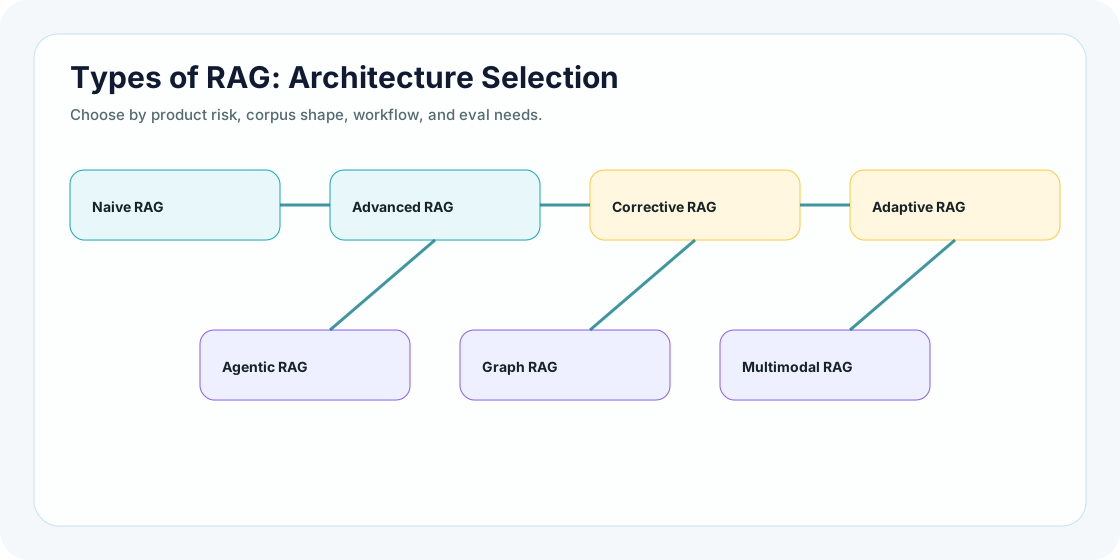
Types of RAG architecture selection diagram
Choose the architecture by problem shape, not by hype. Each extra capability should pay rent.
Sub-topic 7 of 11

Decision Framework

Use this like an architecture review board. Do not choose a RAG pattern because it sounds modern. Choose it because the product risk, corpus shape, and workflow demand it.

North starSmallest architecture that can answer safely, consistently, and observably.

If a simpler path passes evals and handles the risk, keep it simple. If it fails, upgrade with a reason.

01

Is the question simple and source-grounded?

If the answer usually lives in one clear document or one clean knowledge area.

ChooseNaive RAG or Advanced RAG

Prove it with citation precision, Recall@5, and simple unsupported-answer checks.

02

Does the answer need multiple documents, policies, or metadata?

If country, role, product tier, date, contract type, or policy version changes the answer.

ChooseAdvanced RAG

Prove it with metadata-filter tests, reranker evals, source coverage, and stale-policy checks.

03

Can retrieval fail dangerously?

If a wrong confident answer can create security, legal, financial, health, or compliance risk.

ChooseCorrective RAG

Prove it with refusal accuracy, escalation correctness, confidence-threshold tests, and evidence-support checks.

04

Do queries vary by risk and complexity?

If some questions are cheap FAQ lookups while others require strict policy reasoning.

ChooseAdaptive RAG

Prove it with route accuracy, route-level latency, fallback rate, and consistency across similar questions.

05

Does the product need controlled action?

If the assistant must create tickets, call tools, update records, ask follow-ups, or execute workflows.

ChooseAgentic RAG with approval gates

Prove it with tool-call precision, approval-gate coverage, audit logs, rollback tests, and human-in-loop checks.

Relationship-heavy domain?Upgrade to Graph RAG

When entities, links, dependencies, and multi-hop relationships are the actual product value.

Knowledge outside text?Upgrade to Multimodal RAG

When the evidence lives in screenshots, diagrams, tables, slides, PDFs, audio, or video.

Sub-topic 8 of 11

Production Trade-Offs

Production gear
  • Simplicity: Naive RAG is easier to debug and cheaper to run.
  • Accuracy: Advanced retrieval and reranking can improve grounding.
  • Safety: Corrective RAG helps avoid unsupported answers.
  • Flexibility: Adaptive RAG avoids one-size-fits-all pipelines.
  • Workflow power: Agentic RAG can act, but it must be constrained and logged.
  • Knowledge structure: Graph RAG helps when relationships matter more than isolated chunks.

Senior builder habit: add architecture only when a failure mode or product requirement justifies it.

Sub-topic 9 of 11

Common Mistakes

These are not theoretical mistakes. These are the kinds of mistakes teams make when they jump from a good RAG demo to a product that real users depend on.

01

Using agentic RAG before simple retrieval is proven weak

Symptom: the assistant plans, loops, and calls tools for questions a normal search pipeline could answer.
Why it happens: agents feel innovative, so teams add autonomy before proving a workflow needs autonomy.
Better move: start with naive or advanced RAG, measure failures, then add agentic behavior only for multi-step tasks with clear approval gates.
02

Calling any retrieval system "advanced RAG"

Symptom: the architecture says "advanced" but there is no metadata strategy, hybrid search, reranking, compression, or eval improvement.
Why it happens: teams use architecture names as branding instead of engineering contracts.
Better move: define exactly what capability was added and which metric improved because of it.
03

Choosing graph RAG when the problem is not relationship-heavy

Symptom: a graph pipeline is built for ordinary FAQ questions, adding extraction and entity-resolution work with no product gain.
Why it happens: graph RAG sounds deeper than chunk retrieval, so it gets selected for prestige.
Better move: use graph RAG only when entities, dependencies, paths, or multi-hop relationships are the core value.
04

Ignoring routing mistakes in adaptive RAG

Symptom: similar questions go through different pipelines and produce inconsistent answers.
Why it happens: the router is treated as glue code, not as a decision model that needs evaluation.
Better move: build route evals, route confusion matrices, and fallback rules for uncertain classification.
05

Adding corrective RAG without tuning refusal behavior

Symptom: the assistant either refuses too often or answers risky questions with weak evidence.
Why it happens: teams add a confidence check but do not measure false accepts and false rejects separately.
Better move: track unsupported-answer rate, over-refusal rate, escalation precision, and high-risk false accepts.
06

Using multimodal RAG without source-region evidence

Symptom: the assistant answers from PDFs, tables, slides, or screenshots but cannot show where the evidence came from.
Why it happens: teams index extracted text but lose page numbers, bounding boxes, table coordinates, and media timestamps.
Better move: store source-region metadata and test OCR, table extraction, and visual grounding separately.
07

Overbuilding modular RAG before ownership is clear

Symptom: the architecture has many components, but failures bounce between ingestion, retrieval, prompt, eval, and platform teams.
Why it happens: modularity is added as folder structure, not as operational ownership.
Better move: define contracts, owners, dashboards, rollback paths, and trace ids for every module.
08

Evaluating only the final answer

Symptom: sample answers look good, but nobody knows whether the right documents were retrieved.
Why it happens: final outputs are easier to review than retrieval traces.
Better move: evaluate retrieval and generation separately: source recall, citation support, groundedness, refusal accuracy, and answer usefulness.
09

Forgetting access control during retrieval

Symptom: the model does not leak by itself, but retrieval fetches documents the user should never see.
Why it happens: teams add permissions to the UI but not to the retrieval layer.
Better move: enforce document-level permissions before retrieval results enter the prompt.
10

Treating index freshness as a background detail

Symptom: the assistant cites old policies after a new policy has already been approved.
Why it happens: indexing is treated as one-time setup instead of a release pipeline.
Better move: version indexes, validate freshness, track source age, and support rollback when a bad index is published.
11

Choosing architecture by hype instead of failure mode

Symptom: every use case becomes agentic, graph, multimodal, corrective, and adaptive at the same time.
Why it happens: teams confuse feature richness with reliability.
Better move: write the failure mode first, then select the smallest architecture that fixes it.
12

Missing observability for architecture decisions

Symptom: nobody can explain why a query used naive RAG, corrective RAG, graph RAG, or agentic RAG.
Why it happens: the system logs model output but not route, risk score, selected pattern, retrieved evidence, or fallback reason.
Better move: log selected architecture, route reason, source ids, confidence signals, answer status, latency, and cost.
Senior takeaway: most RAG mistakes are not model mistakes. They are architecture-selection mistakes, evaluation mistakes, permission mistakes, freshness mistakes, and observability mistakes.
Sub-topic 10 of 11

Mini Assignment

Choose three products: an HR assistant, a developer docs assistant, and a security runbook assistant. Pick the RAG type for each. Explain why the simplest option is enough or why a stronger pattern is justified.

Sub-topic 11 of 11

Points To Remember

  • RAG is a family of architecture patterns.
  • Naive RAG is valid when the problem is simple and low risk.
  • Advanced RAG improves retrieval, context, grounding, and evaluation.
  • Corrective and adaptive RAG are useful when risk or query complexity varies.
  • Agentic, graph, and multimodal RAG should be justified by product needs.

Next, test architecture selection in the quiz, then practice choosing RAG patterns for production scenarios.

← Chapter 2 ProjectTake the Quiz →